
4admin is an Letter of Authority (LOA) management tool. It significantly shortens the process of obtaining and extracting the data from LOA responses.
It’s really easy to integrate your 4admin and Genovo accounts. This is not a direct app-to-app integration, but uses a browser extension.
The extension is available for most browsers (Google Chrome, Microsoft Edge, Mozilla Firefox, Brave, etc ). However it is not currently available in Safari.
Installing the browser extension
The process of adding an extension is very similar across most common browsers. The instructions below are for Google Chrome as it is the most commonly used browser with Genovo users.
- Click the three dots in the far right of your browser toolbar
- Hover over Extensions
- Click on Visit Chrome Web Store
- Within the Chrome Web Store, search for 4admin
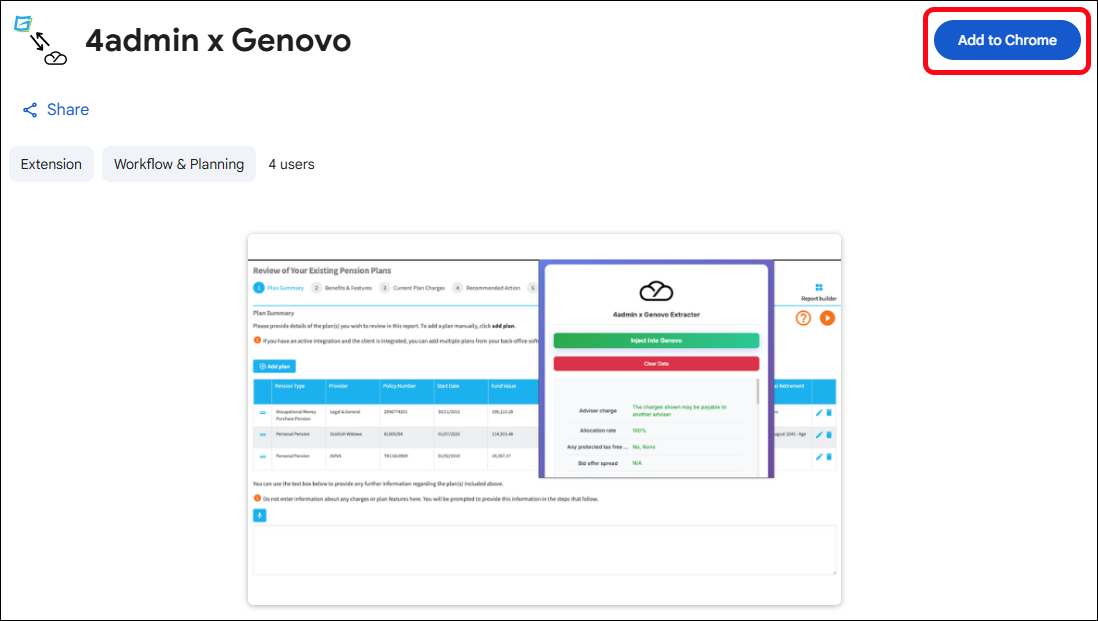
- Click on the 4admin x Genovo item
- Click Add to Chrome and the extension will be installed
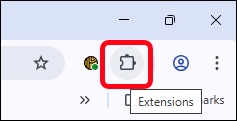
Once the extension is added, it is accessible via the Extensions icon in the browser toolbar:
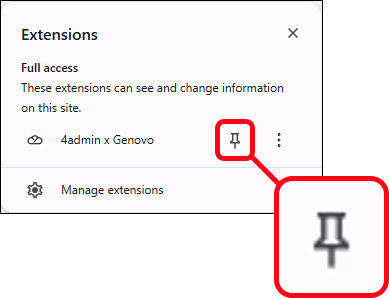
To make the use of the extension a little easier, there's the option of 'pinning' the 4admin extension to the browser toolbar, so that it's available with just a single click. To do this, click on the Extensions icon and then the 'pin' icon next to the 4admin extension:
Note - 4admin also have their own support article for the 4admin / Genovo integration.